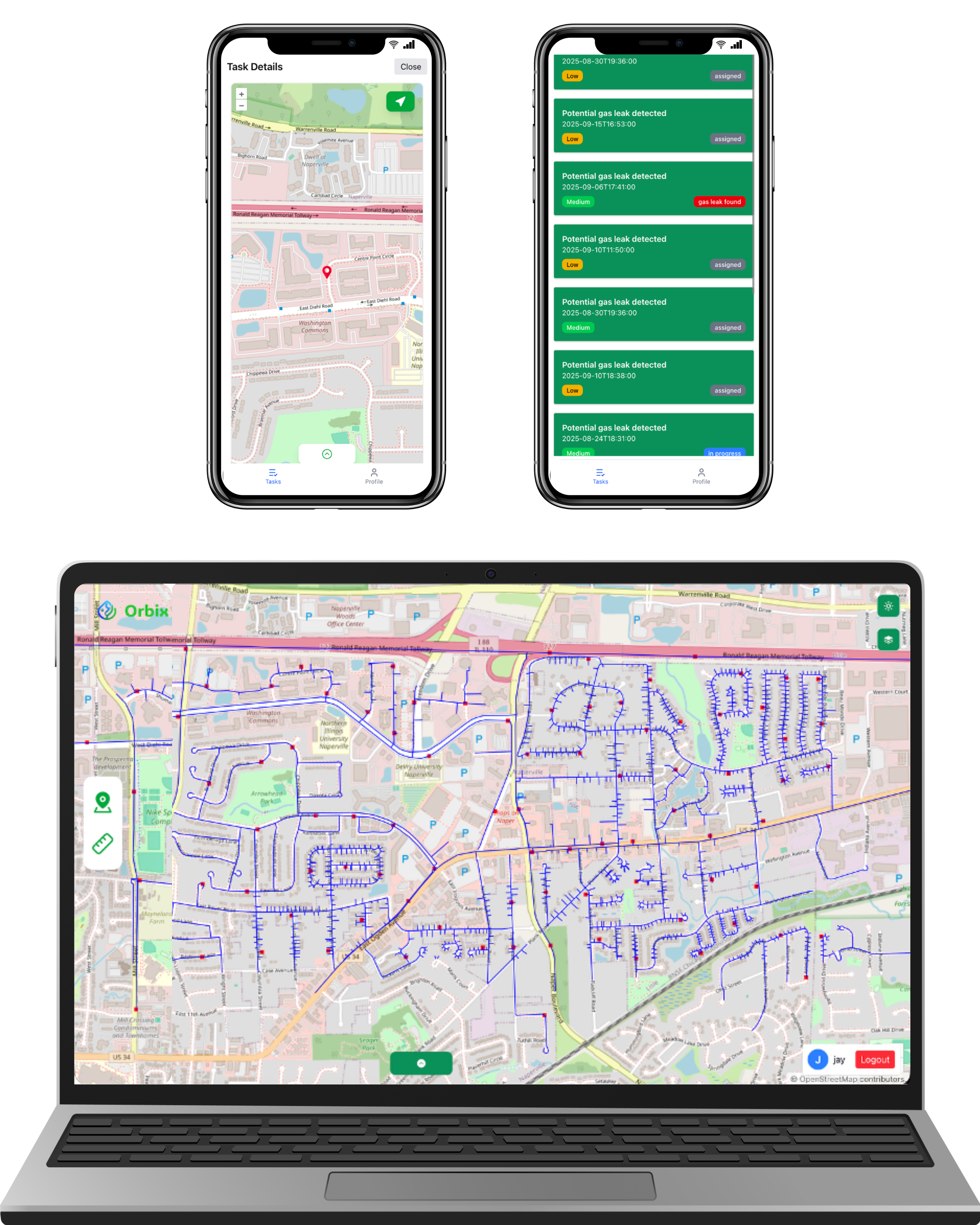

Why Orbix Viewer?

Powerful, open-source spatial workflows

Streamline operations, visualize field data instantly, and manage work orders with full transparency.

Visualize Survey & AMLD Data

Fast rendering, layer visuals, and attribute-rich map exploration.

Filter & Analyze

Geographic selection and advanced attribute filtering for fast insights.

Assign & Track Tasks

Manage work orders with real-time field team updates.

Open & Transparent

Built on open-source tech—your data stays portable and unrestricted.

Real-Time Updates

Instant dataset refresh and real-time field feedback.

Unified Dashboard

Combine survey, GIS layers, AMLD data, and task workflows into one place.

Any detector. One platform.

Upload leak detection data from any device and instantly turn it into maps and meaningful insights. Orbix is device-agnostic, so you can keep the hardware you already trust while upgrading how the data is used.

  • Works with AMLD exports, handheld and vehicle-mounted detectors
  • Compatible with CSV, GeoJSON, Shapefile & vendor formats
  • Normalizes every file into one clean, map-ready view

Orbix lets you focus on better surveys and safer networks — not on replacing equipment.

How Orbix handles your data

From any detector to one clean map

Capture → Normalize → Output
1

Step 1 · Capture

Bring in leak detection data from the hardware you already use.

🛰 AMLD 📟 Handheld 🚚 Vehicle-mounted
2

Step 2 · Normalize

Orbix converts every file into one clean structure automatically.

Supported file types

CSV GeoJSON Shapefile Vendor exports
3

Step 3 · Output

One map-ready view that supervisors and field teams share.

No manual merging or juggling file formats — everyone sees the same, up-to-date truth.

Orbix takes anything in — and returns one clean, trusted view out.

Orbix Viewer Mockup

Solution – Orbix

Orbix Logo

Orbix provides a complete workflow for utility organizations — from survey/AMLD data uploads, field task management, to real-time progress tracking. Built entirely on open-source technologies to ensure transparency and data freedom.

Orbix Admin

  • • Upload survey or AMLD datasets
  • • Download or delete specific survey entries
  • • Manage work orders and user roles
  • • Add or remove supervisors and field workers

Orbix Viewer (Supervisor App)

  • • Visualize spatial layers and attributes
  • • Apply geographic selection and attribute filtering
  • • Assign tasks directly to field workers

Orbix Connect (Worker App)

  • • Receive and manage assigned tasks
  • • Navigate to specific work locations
  • • Attach images and update work notes
  • • Update job status to keep teams aligned